ATTENTION:
For doctors who wants to run a calm, organized, and professional clinic
without long queues and manual paperwork like the following:

Overcrowded
Waiting Areas

Manual Follow-ups and Paper Works

Long Patient Wait Times
INTRODUCING

What is AutoPila
AutoPila is a patient management system that combines Electronic Medical Records (EMR) and real-time queue management, built specifically for small private clinics and hospitals.
By digitizing patient records and automating queues, Autopila reduces long waiting times and overcrowding—allowing doctors, staff, and patients to manage their time and information more efficiently.
BENEFITS FOR DOCTORS AND STAFFS
Less Manual Work
No need to manually text
or call the patients.

On Time Meals
No need to manually text
or call the patients.

More Queue Control
You can see and set how many patients are in line.

Less Crowd Inside
Since most patients are
waiting outside and relaxing.
BENEFITS FOR PATIENTS

Reduces Parking Congestion
Real-time updates ease vehicle congestion by improving patient timing
Save More Time
They can stay productive or do other tasks while in line.

Relax & Refresh
Patients can relax nearby without missing their turn.

Convenience
They just need a phone, internet, and Messenger—things most people already have.
3 VERY SIMPLE STEPS
FOR PATIENTS
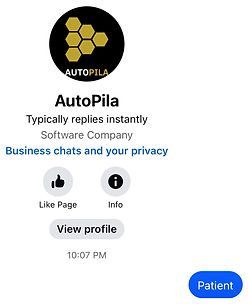
Step 1
Patients message a keyword
to your FB page.
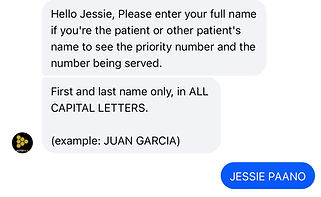
Step 2
They enter their full name
via chat
Step 3
They start receiving
automatic updates
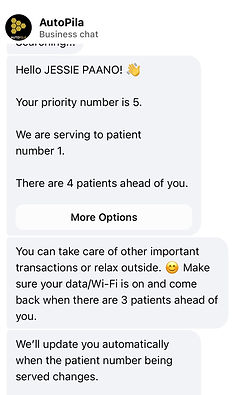
With over 92% of Filipinos using Messenger monthly, it's the smartest and most familiar way to keep patients updated in real time.
WHAT'S INCLUDED?
Save time and reduce repetitive tasks—let Autopila handle patient follow-ups, reviews, and scheduling.
🎯CORE FEATURE 1🎯
🖥
Digital Patient Records
Store and manage complete patient information—such as contact details, diagnoses, prescriptions, and visit history—in one secure system. Records are easy to access during consultations, helping you reduce paperwork, avoid lost files, and focus more on patient care.
🎯CORE FEATURE 2🎯
⚙️
Real-Time Patient Queue
Automatically manage and update your clinic queue in real time. Patients receive live updates about their priority number through Facebook Messenger, allowing them to arrive at the right time, reduce overcrowding, and giving you full control to prioritize emergencies or VIP patients smoothly.
BONUS #1
💬
Automated Post-Consultation Follow-Up
Patients automatically receive reminders about their next check-up or diagnosis, saving you time while ensuring they return for proper care—without any manual follow-up from you or your staff.
BONUS #2
🌟
Smart Reputation Management
Easily boost 5-star reviews by inviting happy patients to share feedback publicly, while less satisfied patients are guided to share concerns privately—helping you improve services and prevent negative reviews.
BONUS #3
🗓
24/7 Online Appointment Scheduling
Let patients book anytime, even when your secretary is unavailable. Capture more appointments—whether scheduled in advance or walk-ins—while keeping your calendar organized and stress-free.
FREQUENTLY ASKED QUESTIONS
Click each question to reveal the answer.
What if I'm not good with technology?
Answer:
No worries, Doc! This system is designed to be simple. You can be completely hands-off. Your secretary or staff can handle this alone.
What if a patient didn’t know how to use Messenger?
Answer:
The system supports a live display of the “Now Serving” number on a TV or monitor. Additionally, senior citizens without Messenger can be prioritized to avoid long waits.
How does the priority number work? Is it based on seats?
Answer:
Priority numbers are assigned based on each patient’s name—not where they sit. They’re free to wait anywhere and no one can cut ahead unless permitted by the staff.
What if the doctor or staff needs to take a short break?
Answer:
You or the staff can simply set the current “Serving” patient back to “Waiting.” This will notify all waiting patients on Messenger that the doctor is temporarily unavailable—perfect for quick breaks or meals.
Can patients access or see the full list of patient names in the system?
Answer:
No. Patients cannot view or access the list of other patients. Only authorized doctors and clinic staff have permission to view, manage, and edit the patient list. This ensures privacy and confidentiality for everyone using the system.
Will this replace our existing system?
Answer:
No. This tool is designed to support, not replace, your current system. It simply collects the patient's name, which your secretary manually inputs into the Google Sheet only. We do not access, and will not attempt to access, your internal system or any medical or financial records. We’re happy to discuss privacy and data handling with your IT personnel to ensure full transparency and security.